🏭 createUseFetch and createUseAsyncData
You can now create custom instances of useFetch and useAsyncData with your own default options (#32300).
// Simple defaults
export const useClientFetch = createUseFetch({
  server: false,
})

// Dynamic defaults with full control over merging
export const useApiFetch = createUseFetch((currentOptions) => {
  const runtimeConfig = useRuntimeConfig()

  return {
    ...currentOptions,
    baseURL: currentOptions.baseURL ?? runtimeConfig.public.baseApiUrl,
  }
})
Then use them exactly like useFetch – they're fully typed and support all the same options:
<script setup lang="ts">
// Uses your baseURL from runtimeConfig automatically
const { data: users } = await useApiFetch('/users')
</script>
When you pass a plain object, your usage options automatically override the defaults. When you pass a function, you get full control over how options are merged – which means you can compose interceptors, headers, and other complex options however you need.
Under the hood, this is powered by a new Nuxt ad-hoc module that scans your composables directory and automatically registers your custom instances for key injection – so they work seamlessly with SSR, just like useAsyncData and useFetch.
There's also createUseAsyncData for the same pattern with useAsyncData.
🗺️ Vue Router v5
We've upgraded to vue-router v5 (#34181), which removes the dependency on unplugin-vue-router. This is the first major vue-router upgrade since Nuxt 3, and it comes with a bunch of improvements under the hood.
For most apps, this should be a transparent upgrade. If you're using unplugin-vue-router directly, you can remove it from your dependencies.
The next step will be taking typed routes out of experimental status. 👀
💪 Typed Layout Props in definePageMeta
You can now pass props to your layouts directly from definePageMeta (#34262). This means your layouts can be parameterised per-page without needing to use provide/inject or other workarounds. Check out the updated docs for the full details.
definePageMeta({
  layout: {
    name: 'panel',
    props: {
      sidebar: true,
      title: 'Dashboard',
    },
  },
})
Even better – the props are fully typed (#34409). If your layout defines props, you'll get autocomplete and type-checking in definePageMeta.
<script setup lang="ts">
defineProps<{
  sidebar?: boolean
  title?: string
}>()
</script>
🗣️ useAnnouncer Composable
Accessibility got a major boost with the new useAnnouncer composable and <NuxtAnnouncer> component (#34318). While useRouteAnnouncer handles page navigation for screen readers, many apps need to announce dynamic in-page changes – form submissions, loading states, search results, and more.
<template>
  <NuxtAnnouncer />
  <NuxtRouteAnnouncer />
  <NuxtLayout>
    <NuxtPage />
  </NuxtLayout>
</template>
<script setup lang="ts">
const { polite, assertive } = useAnnouncer()

async function submitForm() {
  try {
    await $fetch('/api/contact', { method: 'POST', body: formData })
    polite('Message sent successfully')
  }
  catch (error) {
    assertive('Error: Failed to send message')
  }
}
</script>
useAnnouncer is most useful when content changes dynamically without a corresponding focus change.🚀 Migrate to unrouting
We've migrated Nuxt's file-system route generation to unrouting (#34316), which uses a trie data structure for constructing routes. The cold start is roughly the same (~8ms vs ~6ms for large apps), but dev server changes are up to 28x faster when you're not adding/removing pages, and ~15% faster even when you are.
This also makes route generation more deterministic – it's no longer sensitive to page file ordering.
🍫 Smarter Payload Handling for Cached Routes
When a cached route (ISR/SWR) is rendered at runtime with payload extraction enabled, the browser immediately fetches _payload.json as a second request – which triggers a full SSR re-render of the same page. In serverless environments, this can spin up a second lambda before the first response has even finished streaming.
This release addresses this with two changes (#34410):
- A new
payloadExtraction: 'client'mode that inlines the full payload in the initial HTML response while still generating_payload.jsonfor client-side navigation - A runtime in-memory LRU payload cache so that
_payload.jsonrequests can be served without a full re-render
export default defineNuxtConfig({
  experimental: {
    payloadExtraction: 'client',
  },
})
payloadExtraction: 'client' will become the default with compatibilityVersion: 5. The runtime cache is active for all users.🍪 refresh Option for useCookie
If you're using cookies for session management, you've probably run into the problem of needing to extend a cookie's expiration without changing its value. The new refresh option makes this simple (#33814):
const session = useCookie('session-id', {
  maxAge: 60 * 60,
  refresh: true,
})

// Extends expiration each time, even with the same value
session.value = session.value
♻️ useState Reset to Default
useState and clearNuxtState now support resetting to the initial value instead of clearing to undefined (#33527). This aligns with how useAsyncData handles resets and is more intuitive for state management.
const count = useState('counter', () => 0)
count.value = 42

// Resets to 0 (the init value), not undefined
clearNuxtState('counter')
🕵️♂️ Better Import Protection
Inspired by features in TanStack Start, import protection now shows suggestions and a full trace of where a problematic import originated (#34454). This makes it much easier to debug why a server-only import ended up in your client bundle.
For example, if you accidentally import from a server route in a component:
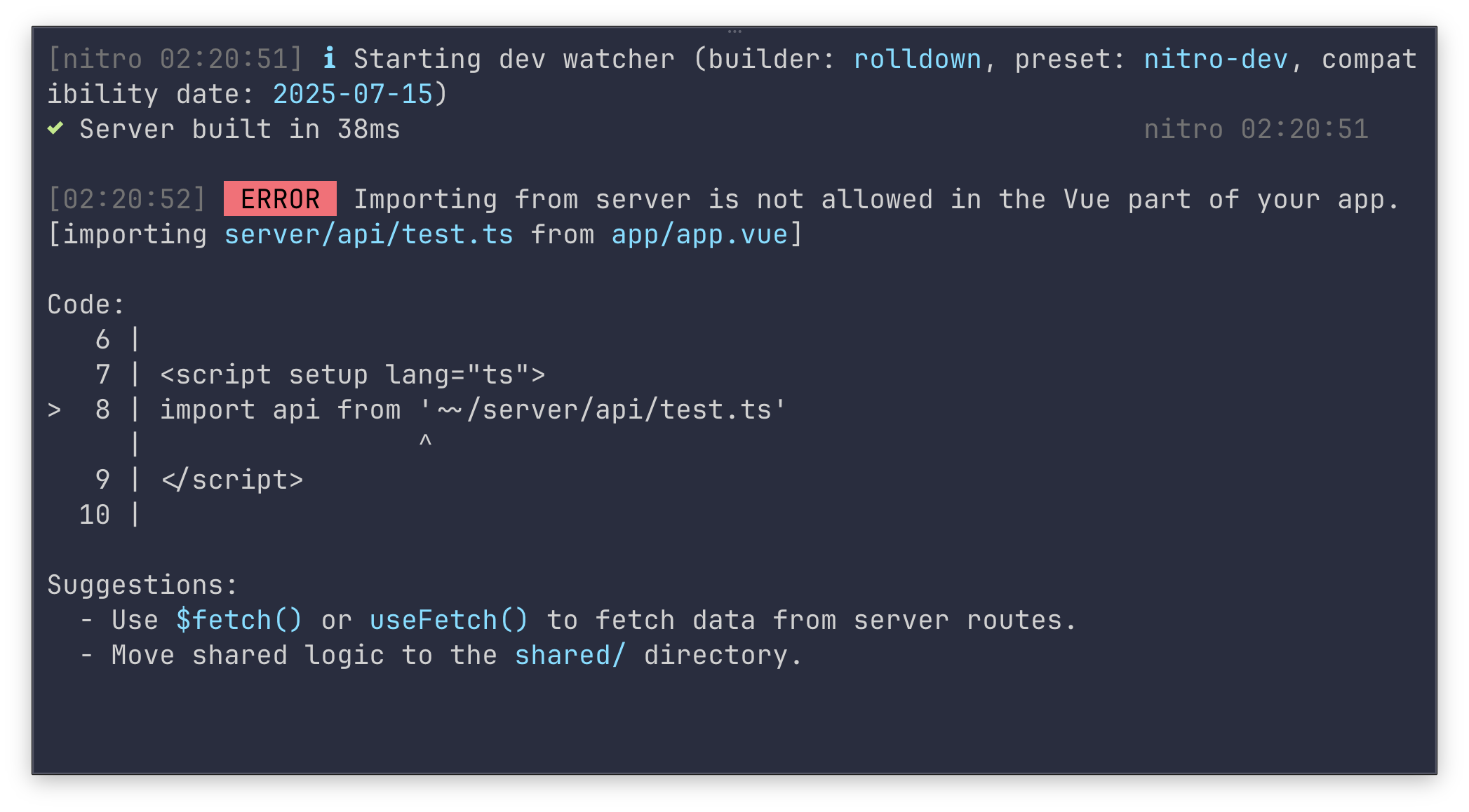
The trace shows the import chain (the component was imported from a page), the exact line of code, and actionable suggestions for how to fix it.
We plan to continue work on improving our error messages. 🪵
🔮 View Transitions Types
You can now define view transition types in Nuxt's experimental view transitions support (#31982). This lets you use different transition styles for different navigation patterns (forwards vs. backwards, tabs vs. pages, etc.).
💡 Improved optimizeDeps Hints
When Vite discovers new dependencies at runtime and triggers page reloads, Nuxt now shows a clear, copy-pasteable nuxt.config.ts snippet to pre-bundle them (#34320). It also warns about unresolvable entries at startup.
🏷️ Normalised Page Component Names (Experimental)
A new experimental option normalises page component names to match route names (#33513), which can help with consistency in devtools and debugging.
export default defineNuxtConfig({
  experimental: {
    normalizeComponentNames: true,
  },
})
⚡ Build Profiling
Ever wondered where your build time goes? You can now get a detailed performance breakdown of your Nuxt builds (#34468, nuxt/cli#1243):
nuxt build --profile
This produces a report showing duration, RSS delta, and heap delta for every build phase, module, and bundler plugin:
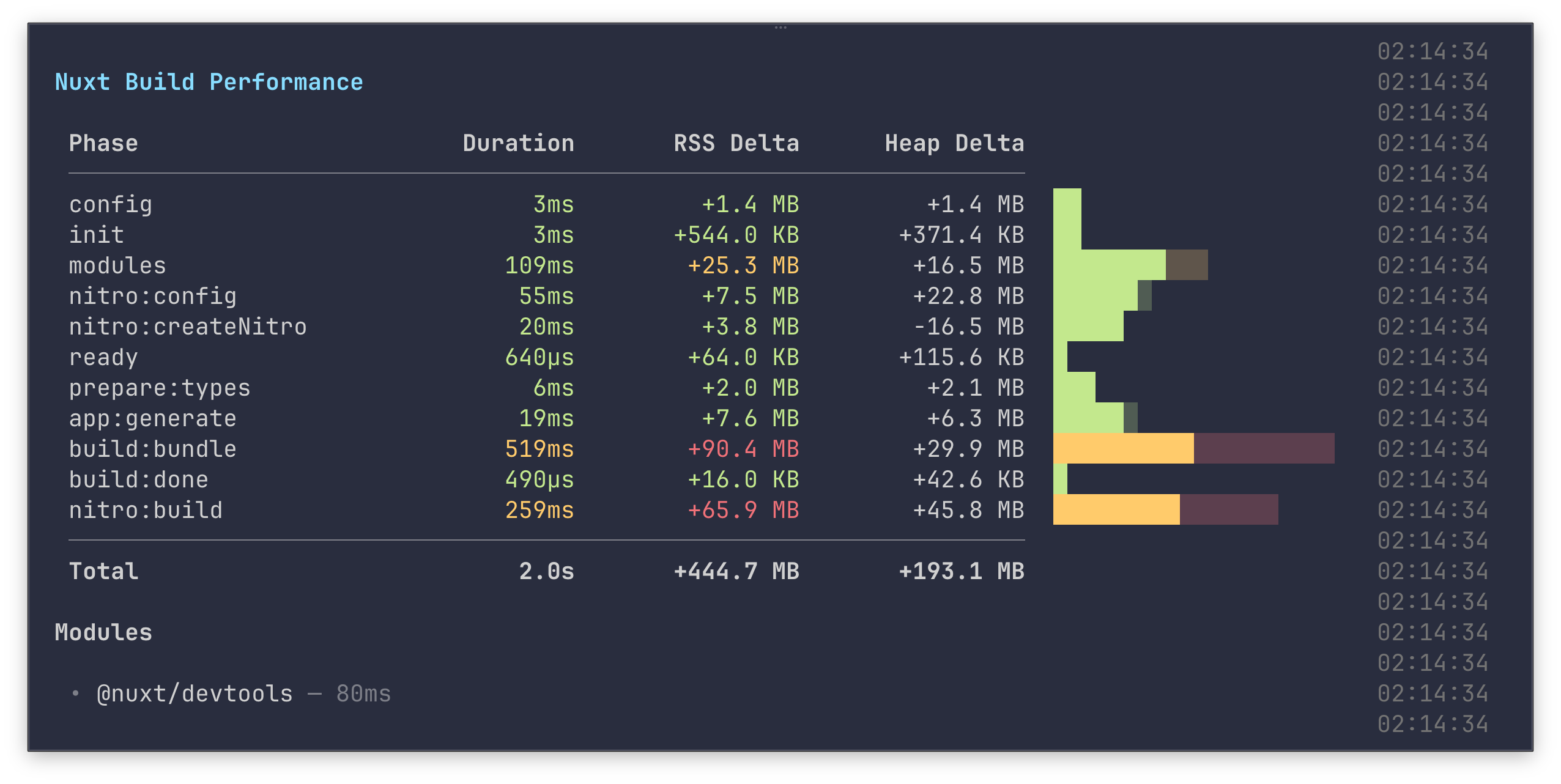
It also profiles individual modules and bundler plugins, making it easy to spot bottlenecks. Three output formats are written:
- Chrome Trace (
.nuxt/perf-trace.json) – open inchrome://tracingor Perfetto for a visual timeline - JSON report (
.nuxt/perf-report.json) – machine-readable data for tracking over time - CPU profile (
nuxt-build.cpuprofile) – open in Chrome DevTools or VS Code for flame graphs
For even more detail, use --profile=verbose to print timing breakdowns to the console.
We'll be using this feature to make Nuxt even faster – and if performance is something you care about, this might be a good opportunity to contribute!
🔥 Performance Improvements
- 14,000x faster module ID parsing – replaced
new URL()+ regex chain with a singleindexOf+ slice (#34451) - Disabled NuxtLink visibility prefetching in dev – stops Vite from discovering and reloading deps unnecessarily during development (#34325)
⬆︎ Upgrading
Our recommendation for upgrading is to run:
npx nuxt upgrade --dedupe
This will deduplicate your lockfile and help ensure you pull in updates from other dependencies that Nuxt relies on, particularly in the unjs ecosystem.
👉 Full Release Notes
Thank you to all of the many contributors to this release! 💚